Using Triggers and sinks
In the last topic we used the CloudEvents Player as an event source to send events to the Broker. We now want the event to go from the Broker to an event sink.
In this topic, we will use the CloudEvents Player as the sink as well as a source. This means we will be using the CloudEvents Player to both send and receive events. We will use a Trigger to listen for events in the Broker to send to the sink.
Creating your first Trigger
Create a Trigger that listens for CloudEvents from the event source and places them into the sink, which is also the CloudEvents Player app.
Use the same Quickstart cluster and default namespace as in the source lesson.
kn trigger create cloudevents-trigger \
  --sink cloudevents-player --broker example-broker
kubectl get trigger cloudevents-trigger
Expected result
The Trigger is created in default. Wait for READY to be True before sending another event.
YAML equivalent (not needed for this route)
What CloudEvents is my Trigger listening for?
Because we didn't specify a --filter in our kn command, the Trigger is listening for any CloudEvents coming into the Broker.
Expand the next note to see how to use Filters.
Now, when we go back to the CloudEvents Player and send an event, we see that CloudEvents are both sent and received by the CloudEvents Player:
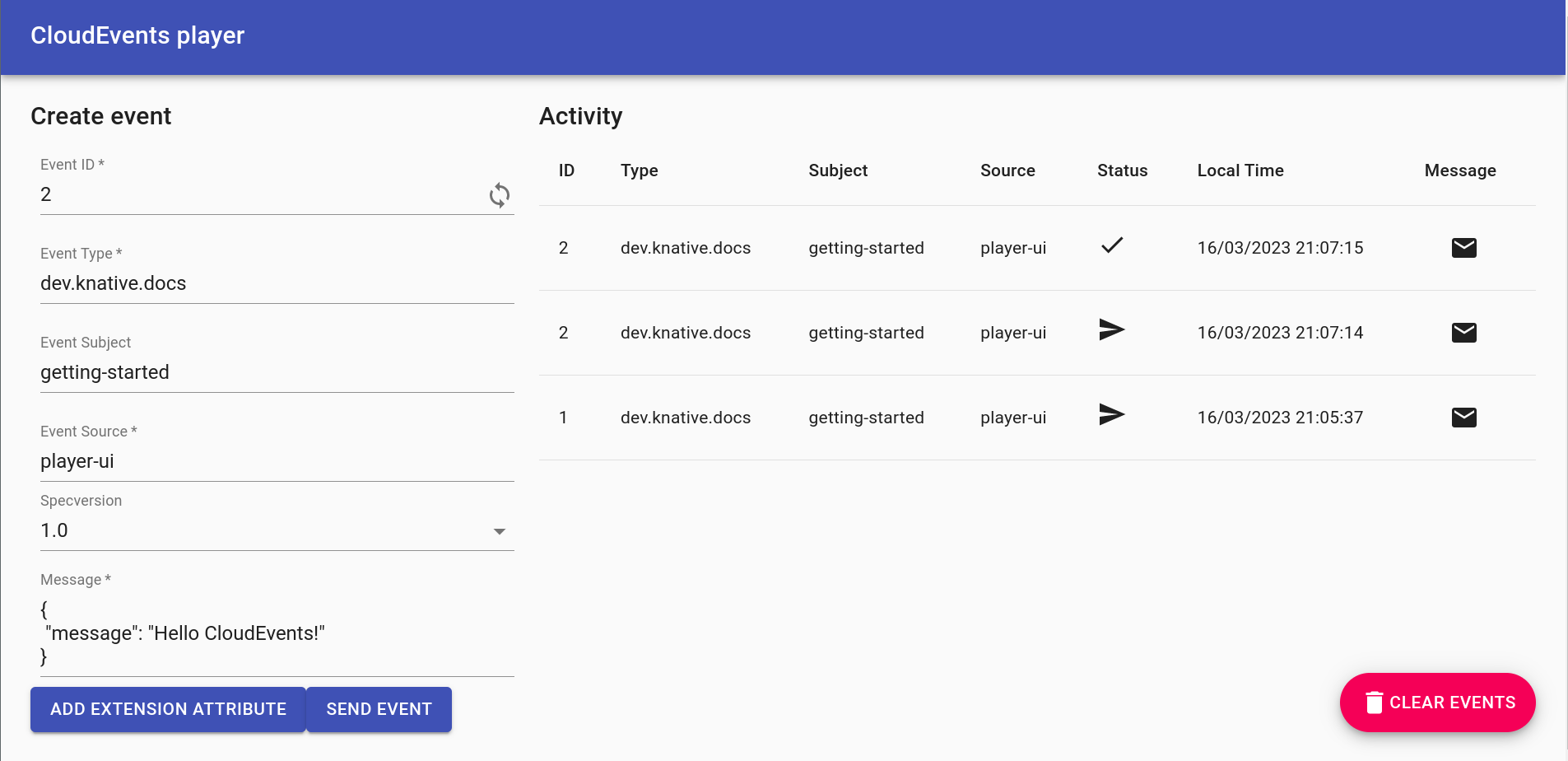
You may need to refresh the page to see your changes.
What if I want to filter on CloudEvent attributes?
First, delete your existing Trigger:
kn trigger delete cloudevents-trigger
kn trigger create cloudevents-player-filter --sink cloudevents-player --broker example-broker --filter type=some-type
If you send a CloudEvent with type some-type, it is reflected in the CloudEvents Player UI. The Trigger ignores any other types.
This example matches the CloudEvent type attribute, not fields inside its data payload. See the Trigger filtering reference for filtering details.
You have now observed a complete event path: Player → Broker → Trigger → Player. The sent and received entries show the two sides of that path.
For your own workloads, route matching events with a Trigger, or configure retries and a dead-letter sink in an isolated test. If delivery is not working, start with events not reaching a subscriber or repeated delivery failures, according to the evidence you have.
Previous: Send an event · Next: Choose your next step
Finished experimenting? Clean up the disposable cluster.