Slack sink - Learning Knative Eventing and the Apache Camel K integration
Optional integration recipe — the core Bookstore tutorial is already complete. The retained examples assume its resources remain in default and sample commands run from start.
Pending runtime validation — not an executable follow-on lesson
The examples install the operator and IntegrationPlatform in camel-k, but create the Pipe, credentials Secret, and Brokers in default. This page has not established that the shown operator watches default, has the required permissions there, or uses the camel-k platform for builds in that namespace. An operator/platform showing Ready in camel-k does not validate that route. Do not run this recipe expecting an end-to-end result until the namespace, scope, platform, registry, and credential path have been validated together on a disposable cluster.
The intended outcome is Slack notification of reviews classified as inappropriate. The recipe adds Apache Camel K, a Camel build registry, and a Slack webhook; it does not establish delivery timing or availability. The registry kind-registry:5000 is an example, not something Quickstart creates for you. Commands and examples below are retained for technical review, not evidence that this integration has been executed.
What Knative features will we learn about?
- Knative's ability to connect with third-party services, such as Slack, through event-driven integration using Apache Camel K.
What does the final deliverable look like?
The proposed route selects CloudEvents with type moderated-comment and the badwordfilter extension set to bad (binary HTTP header ce-badwordfilter) for notification in the designated Slack channel. Demonstrating that receipt is part of the pending runtime validation.
Install prerequisites
Prerequisite 1: Install Apache Camel-Kamelets
Consult the official installation docs to establish the namespace and operator scope. The retained operator-installation example uses Kustomize; it does not by itself establish reconciliation of the default-namespace Pipe:
kubectl create ns camel-k && \
kubectl apply -k 'github.com/apache/camel-k/install/overlays/kubernetes/descoped?ref=v2.8.0' --server-side
Now you need to setup an IntegrationPlatform with a container registry. You can read more about it in the official installation docs. A registry entry is only one prerequisite; platform selection for the Pipe's namespace and access to that registry still need validation. For example let's say we're using a Kind cluster with a local registry named kind-registry on port 5000. Then your IntegrationPlatform CR will look like the following:
apiVersion: camel.apache.org/v1
kind: IntegrationPlatform
metadata:
  name: camel-k
  namespace: camel-k # Make sure this is the namespace where your operator is running
spec:
  build:
    registry:
      address: kind-registry:5000
      insecure: true
Install it with one command:
cat <<EOF | kubectl apply -f -
apiVersion: camel.apache.org/v1
kind: IntegrationPlatform
metadata:
  name: camel-k
  namespace: camel-k
spec:
  build:
    registry:
      address: kind-registry:5000
      insecure: true
EOF
If you are using other container registries, you may need to read more in the container registry configuration docs for Apache Camel K.
Verify
Check the installation status of the operator:
kubectl get deploy -n camel-k
You will see the output:
NAME               READY   UP-TO-DATE   AVAILABLE   AGE
camel-k-operator   1/1     1            1           47h
And the IntegrationPlatform:
kubectl get integrationplatforms -n camel-k
You will see the output with the registry address:
NAME      PHASE   BUILD STRATEGY   PUBLISH STRATEGY   REGISTRY ADDRESS     DEFAULT RUNTIME   CAMEL VERSION
camel-k   Ready   routine          Jib                kind-registry:5000   3.15.3            4.8.5
Prerequisite 2: Create a Slack App and Generate an Incoming Webhook URL
Follow the instructions here on how to create the Slack workspace and generate an incoming webhook URL for your designated channel where notifications will be sent to.
Verify
You should have a webhook URL that looks like this:
https://hooks.slack.com/services/T00000000/B00000000/XXXXXXXXXXXXXXXXXXXXXXXX
Save this URL as you will need it later. Treat it as a credential: do not commit it, paste it into public logs, or share it in support requests. Revoke it if exposed.
Prerequisite 3: Create a Secret that stores your Slack Credentials
We are storing the webhook URL as a secret. Copy and paste your webhook URL into the file slack-sink/application.properties
slack-sink/application.properties
slack.channel=#bookstore-owner
slack.webhook.url=https://hooks.slack.com/services/T00000000/B00000000/XXXXXXXXXXXXXXXXXXXXXXXX
Then run the following command from the start directory:
kubectl create secret generic slack-credentials --from-file=slack-sink/application.properties
Verify
You should see this message if the secret is created successfully:
secret/slack-credentials created
Implementation
Step 0: Learn about Pipe
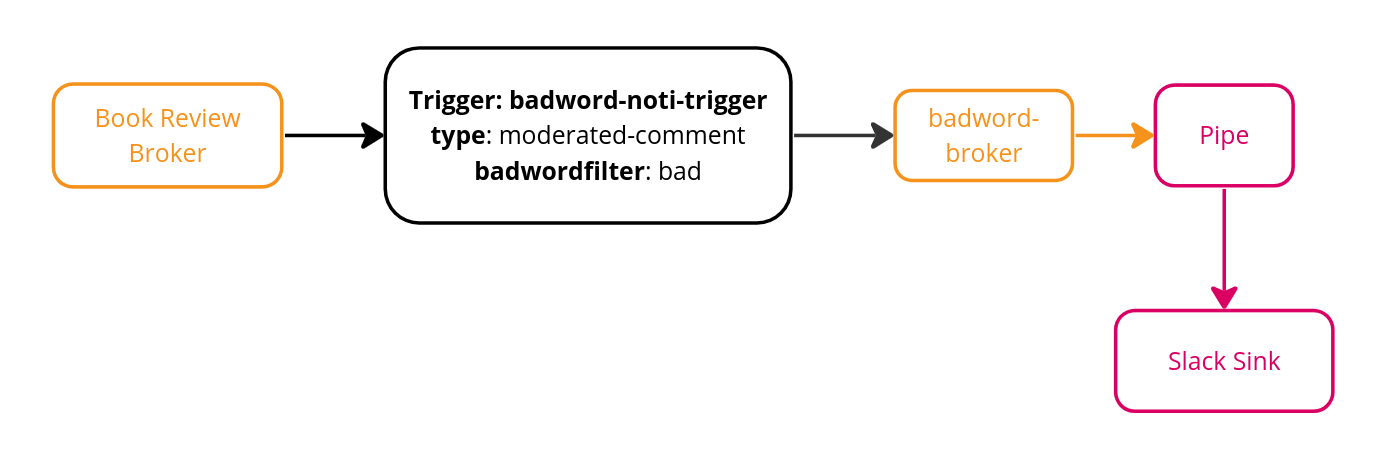
We use a feature called "Pipe" (a.k.a KameletBinding) in Apache Camel K to link event sources and destinations. Specifically, the Pipe connects events from our Broker, our source, to the Slack channel through a Slack sink Kamelet, our destination.
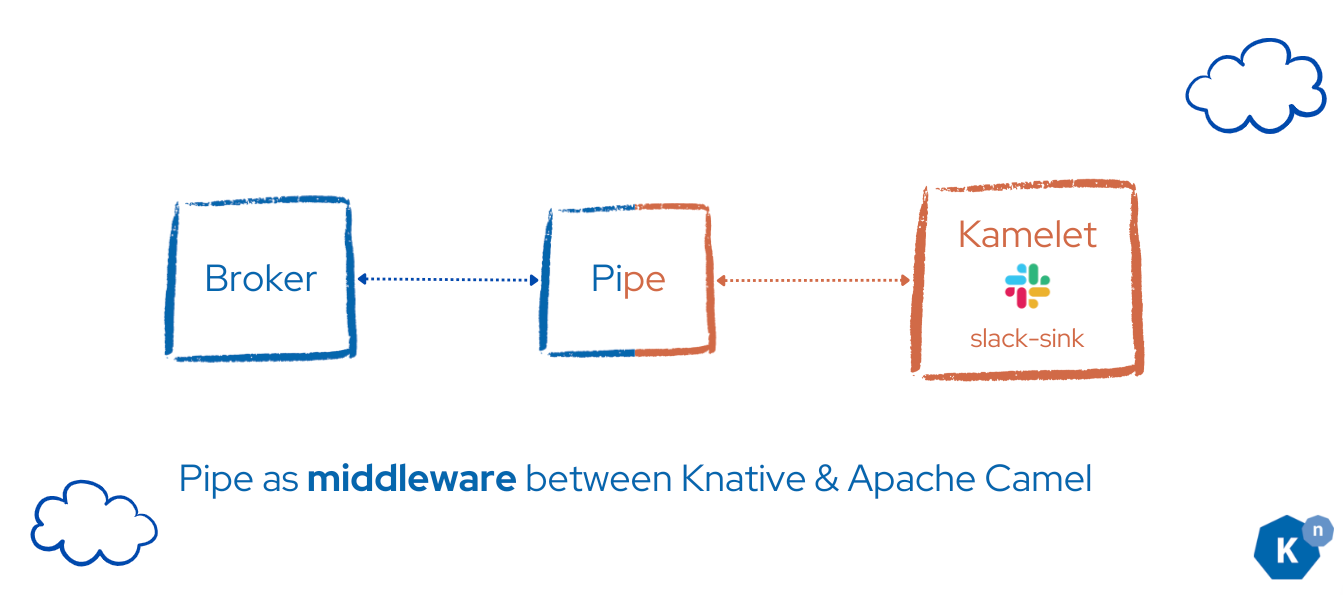
From the sample YAML below, you can see we are telling the pipe to filter on the events that have type "moderated-comment". Pipe will create a Trigger under the hood and route your event to slack-sink.
apiVersion: camel.apache.org/v1
kind: Pipe
metadata:
  name: pipe
spec:
  source:
    ref:
      kind: Broker
      apiVersion: eventing.knative.dev/v1
      name: badword-broker
    properties:
      type: moderated-comment
  sink:
    ...
If you hope to learn more about it, check out the article Event Sourcing with Apache Camel K and Knative Eventing by Matthias Weßendorf!
Step 1: Create the Broker that can route "bad word" comments to Slack
This sample's Pipe source configuration selects the CloudEvent type moderated-comment. To select the badwordfilter extension as well, the sample uses a Knative Trigger before a second Broker. This demonstrates extension filtering without relying on additional Camel K source-filtering behavior; consult the Camel K version's documentation for supported options.

Here, we will be connecting bookstore-broker with a new Broker called badword-broker. A Trigger selects badwordfilter: bad and sends only those processed events to the second Broker. Create the missing sample configuration directory first:
mkdir -p slack-sink/config
- 1: Create a new file named
slack-sink/config/100-broker.yamland add the following content:
slack-sink/config/100-broker.yaml
---
apiVersion: eventing.knative.dev/v1
kind: Broker
metadata:
  name: badword-broker
-
2: Apply the YAML file:
kubectl apply -f slack-sink/config/100-broker.yaml
You should see this message if the Broker is created successfully:
broker.eventing.knative.dev/badword-broker created
Alternatively, use the Knative CLI kn to create the broker:
kn broker create badword-broker
You should see this message if the Broker is created successfully:
Broker 'badword-broker' successfully created in namespace 'default'.
Verify
Run the following command to list the Brokers:
kubectl get brokers
You should see the badword-broker listed.
NAME               URL                                                                                 AGE     READY   REASON
badword-broker     http://broker-ingress.knative-eventing.svc.cluster.local/default/badword-broker     3s      True
bookstore-broker   http://broker-ingress.knative-eventing.svc.cluster.local/default/bookstore-broker   5h38m   True
Troubleshooting
If there are issues, use the following command to diagnose:
kubectl describe broker badword-broker
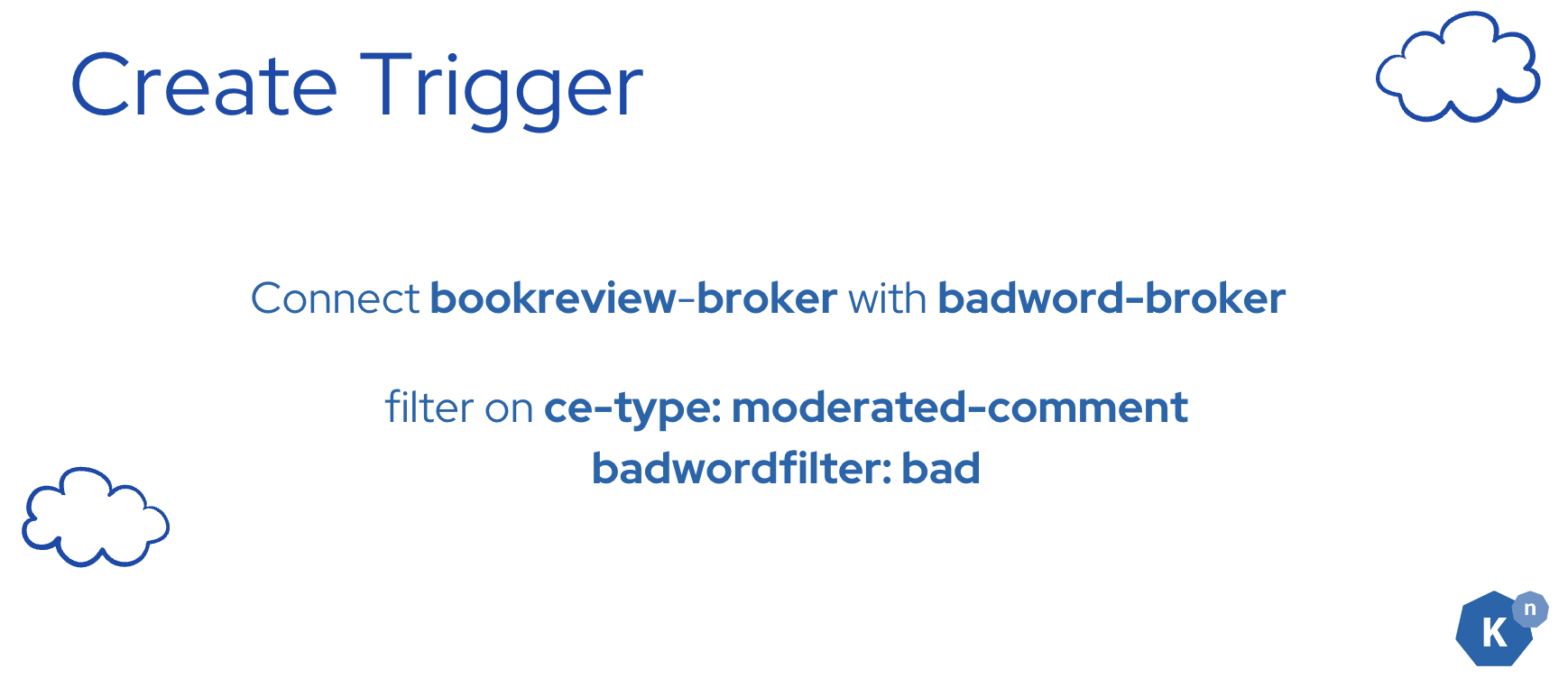
Step 2: Create Trigger that filters for bad word comments to badword-broker
We are creating the Trigger to process the events that have type moderated-comment, and the extension badwordfilter: bad and route them to badword-broker.
Create a Trigger:
- 1: Append the following content to your
slack-sink/config/100-broker.yaml:
slack-sink/config/100-broker.yaml
---
apiVersion: eventing.knative.dev/v1
kind: Trigger
metadata:
  name: badword-noti-trigger
spec:
  broker: bookstore-broker
  filter:
    attributes: # Trigger will filter events based on BOTH the type and badwordfilter attribute
      type: moderated-comment # This is the filter that will be applied to the event, only events with the ce-type moderated-comment will be processed
      badwordfilter: bad # This is the filter that will be applied to the event, only events with the ce-extension badwordfilter: bad will be processed
  subscriber:
    ref:
      apiVersion: eventing.knative.dev/v1
      kind: Broker
      name: badword-broker
-
2: Apply the YAML file:
kubectl apply -f slack-sink/config/100-broker.yamlYou should see this message if the Trigger is created successfully:
broker.eventing.knative.dev/badword-broker unchanged
trigger.eventing.knative.dev/badword-noti-trigger created
Verify
kubectl get triggers
The Trigger badword-noti-trigger should have READY status as True.
NAME                BROKER             SUBSCRIBER_URI                                                       AGE     READY   REASON
db-insert-trigger   bookstore-broker   http://node-server-svc.default.svc.cluster.local/insert              5h41m   True
seq-reply-trigger   bookstore-broker   http://event-display.default.svc.cluster.local                       5h39m   True
sequence-trigger    bookstore-broker   http://sequence-kn-sequence-0-kn-channel.default.svc.cluster.local   5h39m   True
log-trigger         bookstore-broker   http://event-display.default.svc.cluster.local                       5h41m   True
badword-noti-triggerbookstore-broker   http://broker-ingress.knative-eventing.svc.cluster.local/default/badword-broker                       5h41m   True
Step 3: Build the Pipe
The proposed Pipe consumes selected events from badword-broker and sends them to Slack. Before applying it, the reviewer must establish the operator/platform/Secret namespace path described in the warning above.
-
1: Make sure you have your k8s secret that contains your Slack webhook Url ready. If not, refer to the Prerequisite 3 section.
-
2: Prepare the YAML configuration for the Slack sink, which will forward events to your Slack channel:
Create a new file named slack-sink/config/100-slack-sink.yaml and add the following content:
slack-sink/config/100-slack-sink.yaml
apiVersion: camel.apache.org/v1
kind: Pipe
metadata:
  name: pipe
  annotations:
    trait.camel.apache.org/mount.configs: "secret:slack-credentials"
spec:
  source:
    ref:
      kind: Broker
      apiVersion: eventing.knative.dev/v1
      name: badword-broker
    properties:
      type: moderated-comment
  sink:
    ref:
      kind: Kamelet
      apiVersion: camel.apache.org/v1
      name: slack-sink
    properties:
      channel: ${slack.channel}
      webhookUrl: ${slack.webhook.url}
- Apply the configuration to your Kubernetes cluster:
kubectl apply -f slack-sink/config/100-slack-sink.yaml
Verify
You will see this message if the configuration is created successfully:
pipe.camel.apache.org/pipe created
Creation only confirms API acceptance. Inspect the Pipe's conditions and generated resources; the following is a status check, not evidence of successful build or Slack receipt:
kubectl get pipe pipe
NAME              PHASE     REPLICAS
pipe              Ready     1
Step 4: Modify the Knative Services to disable scale to zero
Optional scale-floor experiment, not a prerequisite for proving webhook receipt. A minimum scale requests a lower replica bound for the applicable autoscaler; it is not a guarantee of ready capacity, timely delivery, or uptime.
Camel-managed configuration must persist through reconciliation
A direct patch or edit of a generated Knative Service is not an established persistent configuration path for this integration. Camel K may reconcile the generated resource. Configure a scale floor through the owning Camel resource's supported configuration after validating the version-specific mechanism; this page does not invent a trait setting. Do not rely on a one-time live patch or a pod staying present briefly as proof of persistent configuration.
Inspect the actual generated resources before considering this experiment:
kubectl -n default get ksvc
ksvc means Knative Service. The original example assumed a generated Service named pipe. Verify its name and ownership rather than assuming it exists.
Retained direct-patch example — disposable experiment only
If the generated Service is named pipe, the original patch was:
kubectl -n default patch ksvc pipe --type merge -p '{"spec":{"template":{"metadata":{"annotations":{"autoscaling.knative.dev/min-scale":"1"}}}}}'
The equivalent live edit was kubectl -n default edit ksvc pipe, adding this fragment:
spec:
  template:
    metadata:
      annotations:
        autoscaling.knative.dev/min-scale: "1"
Inspect the Service template, ownership, Ready conditions, and pods after reconciliation. If the annotation does not persist, resolve configuration through the owner rather than repeatedly patching its output. Even a persistent annotation does not prove that a replica is available or that Slack delivery succeeds.
Verification
Runtime validation must first establish that the operator reconciles the Pipe in default, selects a usable platform/registry, mounts the intended Secret, and produces a Ready receiver. Then submit a distinctive test review, confirm its moderated-comment event has badwordfilter: bad, and correlate the event/receiver evidence with a message in the intended test Slack channel. A Ready Pipe, Service, or pod alone does not demonstrate webhook receipt. This validation has not been performed for the retained recipe.
Conclusion
This reference retains the proposed Broker → Trigger → Broker → Camel K Pipe → Slack design and its example configuration. It remains a pending integration experiment, not a completed or validated tutorial.
Next Step

Return to the completed Bookstore core outcome. If you performed any disposable experiments, clean up the cluster and revoke the test Slack webhook when finished.
Previous: Complete the core Bookstore route · Optional next: Extra challenges
If you want to deepen your understanding of Knative, open your bookstore front end, the demo book we used is a great starting point! Check the book "Building Serverless Applications on Knative" by Evan Anderson.
We've prepared additional challenges that build on top of the existing bookstore app for you to tackle. Some solutions are provided, while others are left open to encourage you to explore your own solutions.